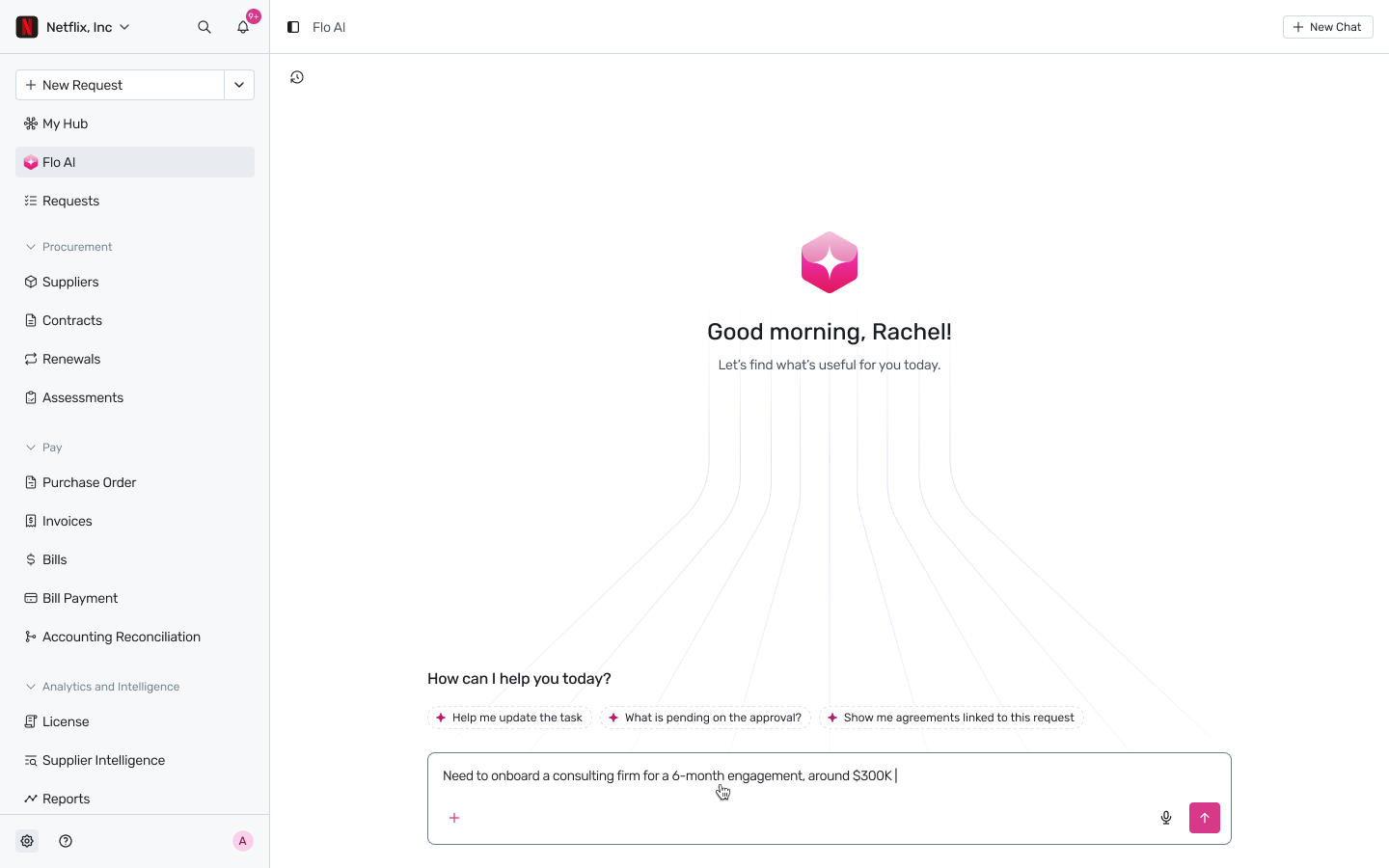
Figure 1.1 — The Spendflo home screen, with the left sidebar showing every module you'll use.
Who it's for: Everyone — first-time users, employees raising their first request, approvers logging in for the first time.
What you'll learn: How Spendflo is organized, where to find the things you'll use most, and how to get a request started in under 60 seconds.
Spendflo is your single destination for buying anything that costs the company money — software, services, hardware, contracts, renewals. Instead of routing requests through email threads, finance forms, and Slack pings, Spendflo brings every step into one workflow that Flo (your AI procurement agent) helps drive forward.
Your home screen at a glance
My Hub — your personal dashboard of requests you've raised, approvals waiting on you, and items needing attention.
Flo AI — a conversational copilot for asking questions, raising requests, and getting unstuck.
Requests — every active and historical request across your team or organization.
Procurement (Suppliers, Contracts, Renewals, Assessments) — the system-of-record for every vendor and agreement.
Pay (Purchase Order, Invoices, Bills, Bill Payment, Accounting Reconciliation) — the AP side of the workflow.
Analytics & Intelligence (License, Supplier Intelligence, Reports) — visibility into spend, usage, and supplier signals.
Three things to try in your first session
Start a request: Click + New Request in the top-left of the sidebar — or just ask Flo. Both routes lead to the same intake form.
Check what needs you: Open My Hub. The notification bell at the top right shows unread alerts.
Ask Flo: Use the search bar or the Ask Flo button to ask plain-English questions like "Show me agreements expiring this quarter".
Tip: Set your notification preferences from the gear icon in the bottom-left so you only see updates that matter to your role.
Was this article helpful?
That’s Great!
Thank you for your feedback
Sorry! We couldn't be helpful
Thank you for your feedback
Feedback sent
We appreciate your effort and will try to fix the article