Overview
Open any request in Spendflo and you're looking at eight tabs of information Overview, Tasks, Approvals, Fields, Documents, Comments, Linked Records, Activity Log. Plus a metadata bar, a phase tracker, and a header full of status pills. That's a lot to read.
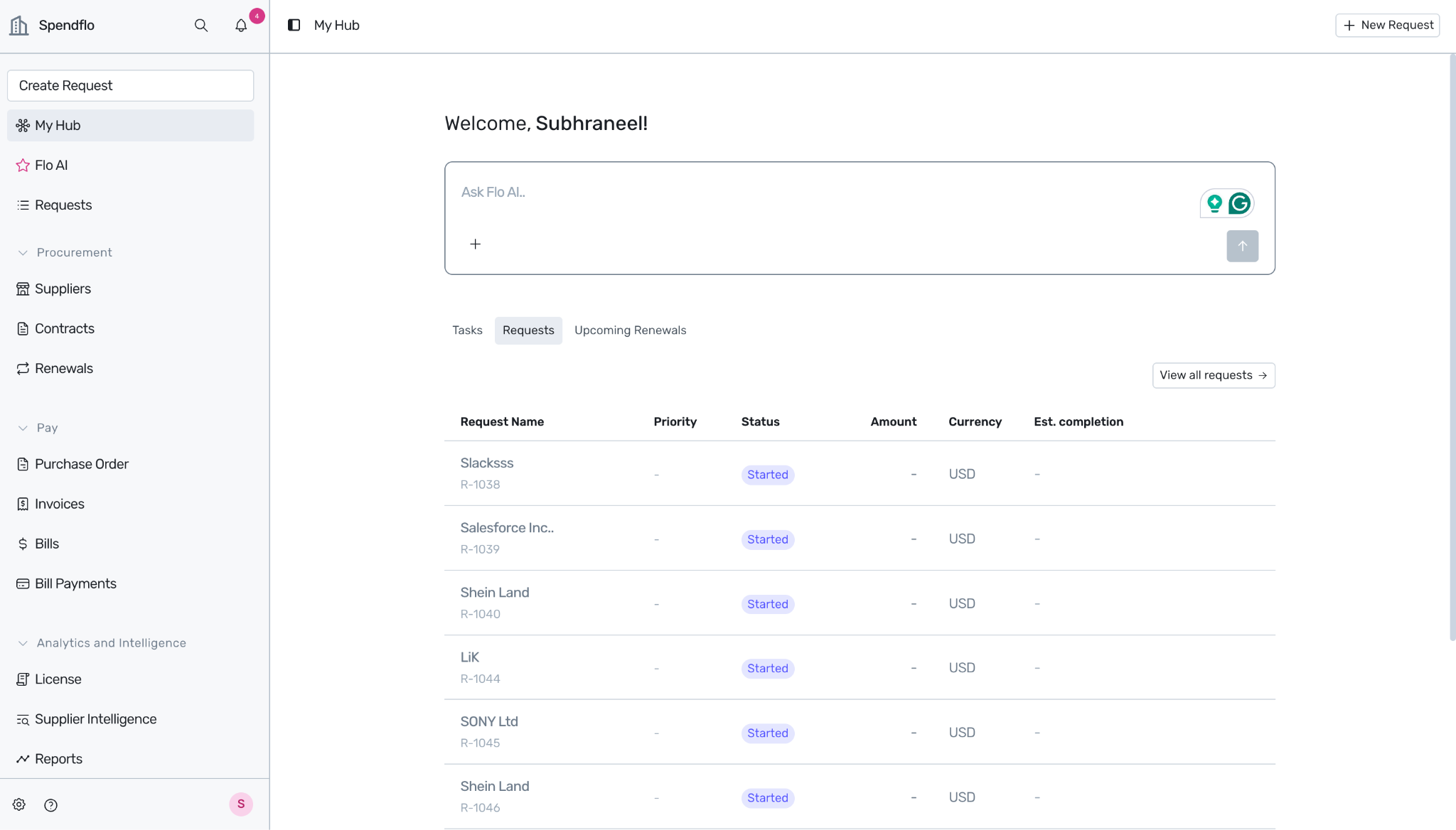
Flo AI compresses all of it into a conversation. Ask once "Give me the full story on R-1038" and Flo AI returns the timeline, the people, the blockers, the linked records, the spend at stake, and the recommended next action. You don't navigate through tabs; the system does the reasoning for you.
This doc is the playbook for getting that full story what Flo AI can pull together, how to ask for it well, and how to dig into the details once you have the big picture.
Who is this for?
Requesters checking in on a request you raised — what's happening, who's holding it, when it'll close.
Request Owners / Procurement Operators picking up an unfamiliar request — orient yourself in 30 seconds before you act.
Approvers preparing to approve or reject — get the context behind the decision, not just the request fields.
Auditors / Finance reconstructing what happened on a closed request — who approved, when, why.
Anyone with View Requests permission. What you see in the answer is bounded by your data access scope. See the Roles in Spendflo doc.
Key Concepts & Terminology
Full Story The compressed narrative answer Flo AI returns when you ask about a request — everything you'd otherwise have to assemble by clicking through the Request Detail page's eight tabs.
/ Reference The shortcut that anchors a Flo AI question on a specific record. Type / then start typing the request ID or name — Flo AI resolves the reference and pulls in everything it knows about that record as conversation context.
Request Detail Page The full UI surface for a single request — header, metadata bar, phase tracker, and the eight tabs. The data Flo AI synthesizes from.
Phase Tracker The horizontal progress indicator across the six request phases: Intake → Review → Approval → Negotiation → Execution → Completion.
Activity Log The immutable, timestamped record of every state change, field edit, approval decision, comment, and task action on a request. Flo AI taps the activity log for the timeline portion of a full story.
Linked Records Vendors, Agreements, Purchase Orders, prior requests, and other entities connected to this request. Flo AI uses linked records to widen context (e.g., "this is the third renewal in this vendor relationship").
Reasoning Pipeline Flo AI's internal layers — Intent Classifier, Entity Resolver, Query Planner, Filter Builder, Execution Graph, Join Validator, Post-Execution Verifier. The full-story response runs through all of them, which is why Flo AI returns deterministic, source-attributed answers instead of best-guess narrative.
Feature Areas
1. The Basic Pattern
The fastest way to get the full story is the simplest:
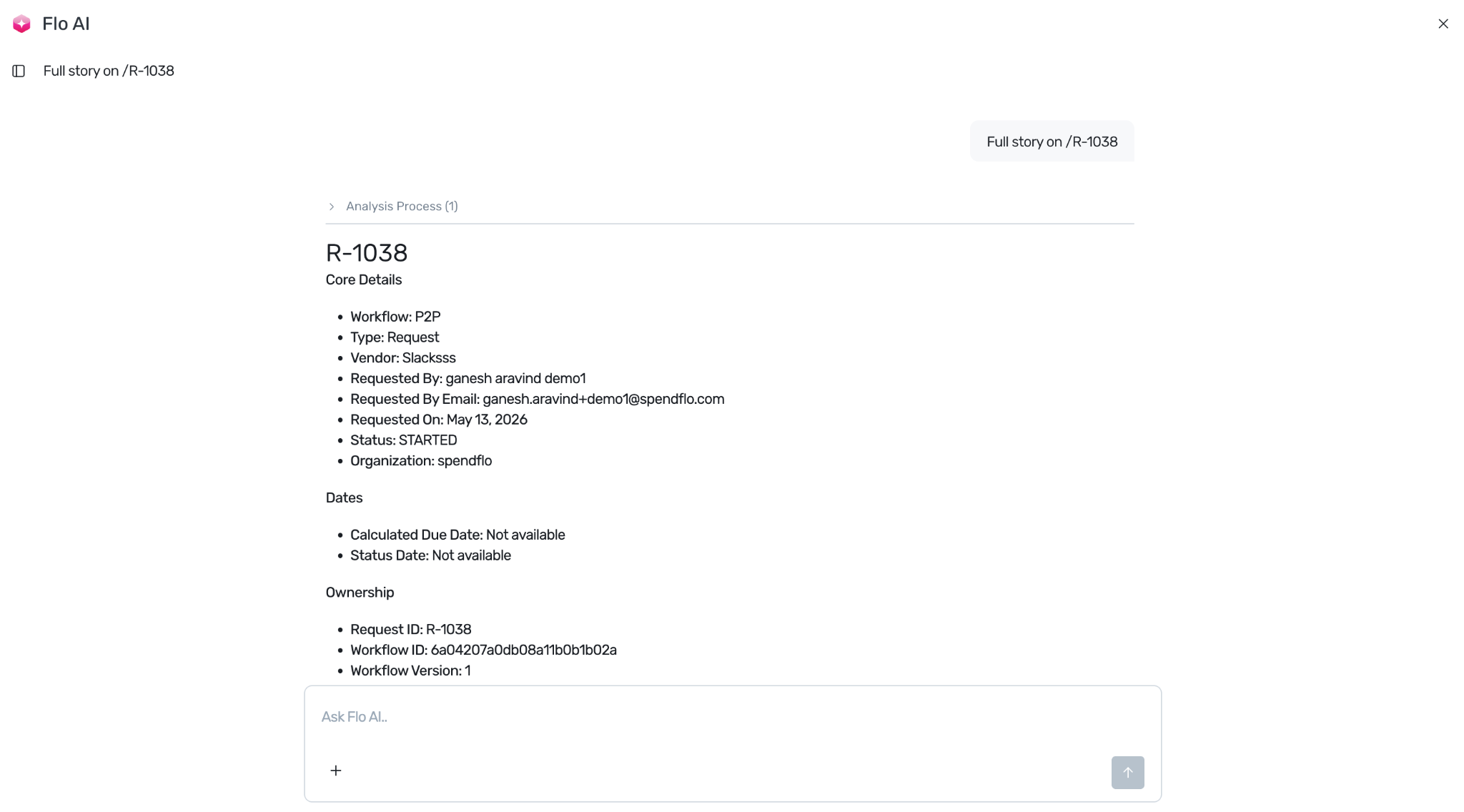
"Full story on /R-1038"
"Tell me everything about /Datadog renewal"
"Summarize /Adobe Creative Cloud — Q2 expansion"
Flo AI resolves the / reference, pulls every relevant fact from the request and its linked records, and returns a structured response:
Header line — what the request is, who raised it, current phase, status
Timeline — what's happened so far, oldest to newest
Current state — the task in flight, who owns it, how long it's been there
Blockers — anything stuck (missing field, awaiting approver, integration error)
Linked context — agreements, vendor, prior requests, related POs
What's at stake — the value being committed, the renewal date, the SLA risk
Recommended next action — concrete advice for whoever asked
2. What Flo AI Pulls From
For one full-story request, Flo AI runs a multi-step orchestration across modules. Behind the scenes, the execution graph looks roughly like this:
Flo AI doesn't dump all of this raw. The Post-Execution Verifier compresses, filters, and orders the data so the answer reads like a briefing — not a database export.
3. Prompt Patterns by Intent
"What is this request?" (lightweight orientation)
"What is /R-10996?"
Returns the one-paragraph elevator pitch: vendor, ask, value, current phase, owner. Good when you just need to recognize a request without diving in.
"Where is it?" (current state)
"Where is /R-10996 right now?"
Returns the current task, assignee, SLA timer, and any inline blocker. Good for a fast progress check.
"Why is it stuck?" (blocker diagnosis)
"What's blocking /R-11042?"
Flo AI walks the current task, checks task prerequisites, looks for unfilled fields, checks integration error states, and surfaces the most likely root cause.
"Who touched it?" (people and history)
"Who has worked on /R-10996?"
Returns a list of contributors — requester, owner, approvers, anyone who commented or took an action — with a one-line summary of what each person did.
"Tell me the timeline" (chronology)
"Walk me through the history of /R-10996, oldest first."
A chronological event list from request creation to now. Good for audit prep and post-mortems.
"What's connected to it?" (related records)
"What's linked to /R-10996?"
Returns vendors, agreements, POs, prior requests, and related Flo AI agent runs (e.g., redlines or dedup checks). Click any to drill in.
"What should I do?" (recommended action)
"What's my next step on /R-10996?"
Tailored to your role — if you're the requester, it might be "wait on Finance approval"; if you're the approver, it might be "review the redline report"; if you're the owner, it might be "ping the assignee — task is past SLA."
"Why was it approved / rejected?" (post-decision rationale)
"Why was /R-10996 rejected?"
Returns the approver, the rejection reason captured at the time, any comments, and the activity-log entry that records the decision.
4. The Compressed Format
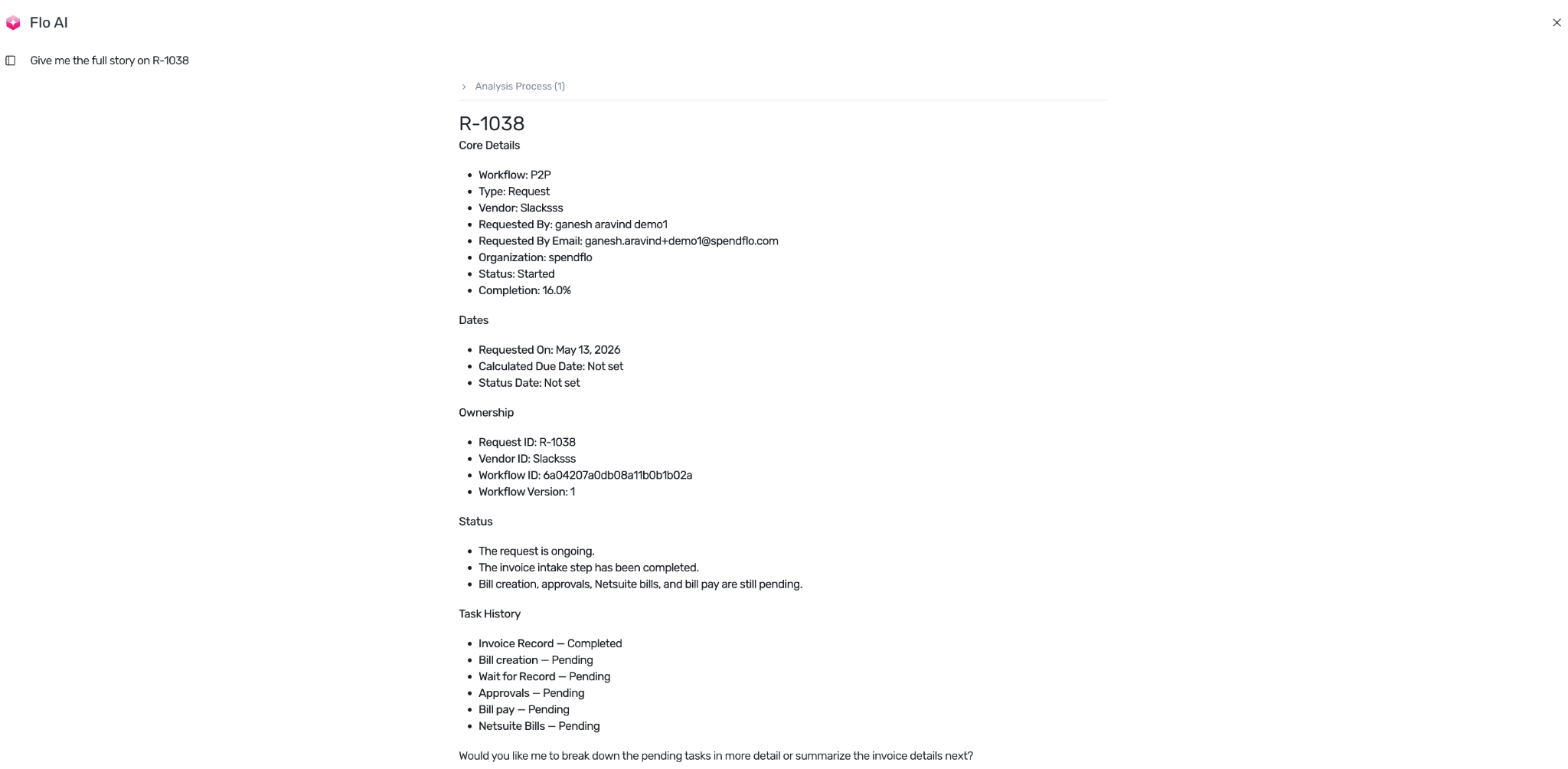
Flo AI defaults to a compact, scannable format. A typical full-story response looks like this:
R-10996 — Datadog renewal expansion Phase: Approval · Owner: Yash Kothari · Days open: 12
Snapshot:
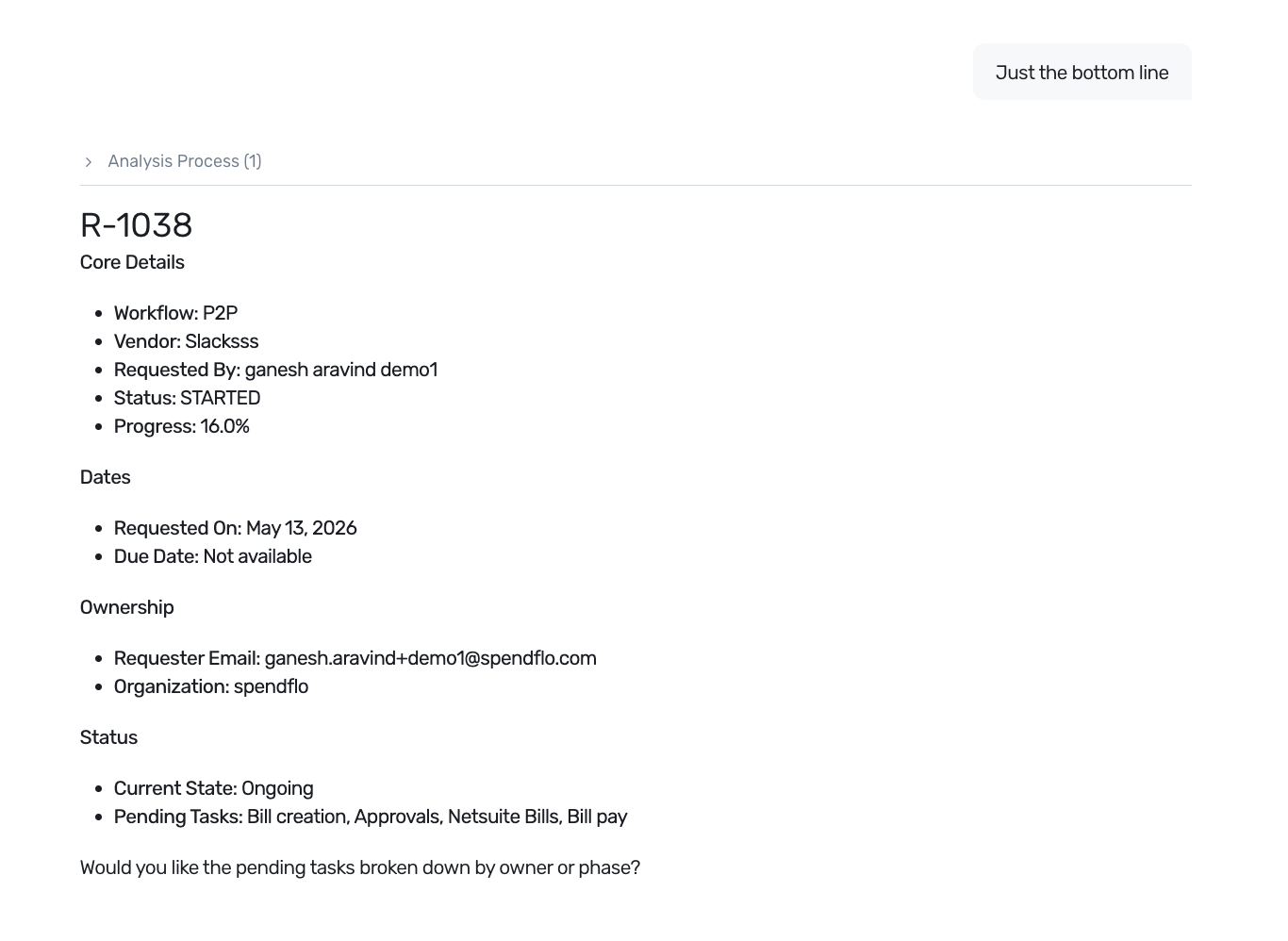
If you want more or less detail, ask:
"More detail on the timeline."
"Just the bottom line."
"Skip the timeline; show me the linked records and what they imply."
6. Follow-up Questions
The full story is rarely the end of the conversation. Common follow-ups:
"Who approved the security review?"
"What's the difference between this request and the 2025 Datadog renewal?"
"What did finance flag in their approval comment?"
"Pull up the redline report from the Contract Redline Agent."
"Show me the spend history for this vendor over the last 24 months."
Each follow-up uses the previous context — you don't need to re-reference /R-10996. Flo AI keeps the anchor alive for the rest of the thread.
7. Multi-Request Stories
You can also ask Flo AI to compose stories across several requests at once.
"Tell me the story across /R-10996 and /R-9412 — what changed?"
"All my open requests this quarter — give me a one-line summary for each."
"Comparative story on the last three Datadog renewals."
For multi-request prompts, Flo AI structures the response as a comparison rather than a single narrative — tables when relevant, parallel timelines when sequencing matters.
8. Sharing a Full Story
Today, the way to share is the simple way: copy the response from Flo AI and paste into Slack, email, or a comment on the request itself. Shared conversation links are on the roadmap.
Sharing inside Spendflo
The fastest way to share inside Spendflo is to add the answer as a comment on the request:
"Add this summary as a comment on /R-10996."
Flo AI shows a preview and confirms before posting. The comment is attributed to you and appears in the Comments tab on the request.
9. Limits and Boundaries
Flo AI is built on a deterministic reasoning architecture — Intent Classifier → Entity Resolver → Query Planner → Filter Builder → Execution Graph → Join Validator → Post-Execution Verifier. This means it will:
Refuse to guess when a field is empty (returns NOT_FOUND rather than a fabricated value).
Ask for clarification when the / reference is ambiguous ("Which Datadog request — R-10996 or R-9412?").
Stay within your data scope — records outside your access don't appear in the response, even as side-references.
Log every retrieval step internally so the answer is auditable.
It will not:
Make a value up to fill a gap in the timeline.
Show comments from records you can't access (they're elided with a "restricted" note).
Take a destructive action on the request as part of summarizing it. Mutations are always explicit and confirmed separately.
If a question requires data Flo AI can't deterministically retrieve, the answer says so — "I don't have visibility into the Procurement Manager's private notes from May 17" — rather than dressing up an uncertain guess as fact.
FAQs
Q: How is "full story" different from the Activity Log tab?
The Activity Log is the raw timeline. The full story is a narrative synthesized across the activity log plus all eight tabs plus linked records plus prior-request context — and tuned for your role. Same source data; very different presentation.
Q: Can Flo AI surface comments from related Slack threads?
Not in V1. The full-story response stays inside Spendflo data. Slack and email context are on the roadmap.
Q: The full story missed an important comment. What happened?
Two common causes: (1) the comment was on a related record that's outside your data scope, so it was elided; (2) the comment was inside an integration's audit log (e.g., NetSuite) rather than in Spendflo's comments. Ask explicitly — "Did anyone leave a comment on the linked PO?" — and Flo AI will widen its retrieval.
Q: Will the full story include AI agent outputs (e.g., Contract Redline)?
Yes — when an agent has run on the request, the agent's structured output is part of the linked-context retrieval. You can also ask explicitly: "Pull up the redline report from the Contract Redline Agent on /R-10996."
Q: Can I get the full story on a closed request?
Yes. Closed requests retain all data and Flo AI can reconstruct the full timeline. Useful for audits.
Q: What's the difference between "Full story on X" and "Walk me through X"?
Cosmetic — both prompts trigger the same orchestration. Phrase it however reads naturally.
Q: Does the order I ask in matter?
Within one full-story prompt, no — Flo AI plans the order of operations internally. But for follow-ups, the order matters: each follow-up uses the anchor and the most recent answer as context, so the conversation builds.
Q: My request is brand new — there's no story yet. What does Flo AI return?
A snapshot of the current state plus a "what to expect next" projection based on the workflow that's running. Useful for requesters who want to know what's coming.
Q: I'm getting too much detail. How do I tighten it?
Tell Flo AI: "Just the bottom line", "Skip the timeline", "Three bullets max", or "Executive summary format". The next response respects the constraint.
Q: Why does the full story sometimes call out specific people by role rather than name?
If someone's name is inside your data scope but the role is more relevant (an Approver, a Procurement Operator), Flo AI surfaces the role. Ask "who specifically?" to get the name.
Troubleshooting
"Flo AI returned a story that's missing chunks I know exist."
Confirm the data is in Spendflo (not in an external system like NetSuite or Slack).
Confirm the data isn't outside your access scope.
Ask explicitly for the missing piece — "Show me the May 17 security review approval."
"Flo AI said NOT_FOUND but the request exists."
Check the / reference resolution — there may be multiple matching records and Flo AI picked the wrong one. Ask clarifying: "Show me requests matching 'Datadog renewal'."
The request may be in a state Flo AI's defaults exclude (e.g., archived). Ask for it by ID directly.
"Story took too long to come back."
For complex multi-record stories, Deep Research mode is the right tool. Standard mode optimizes for sub-5-second responses, which means it may not include the deepest layers of context. Toggle Deep Research and re-ask.
"The recommended next step doesn't make sense for my role."
Flo AI infers your role from your account, but if your effective responsibility on a specific request differs (e.g., you're stepping in for a colleague), tell it: "I'm covering for Yash this week — what should I do on /R-10996?"
"Follow-ups are losing the anchor."
If you change topic mid-thread (e.g., switch from R-10996 to a different request), restate the anchor. Or start a new conversation for the new topic — keeps each conversation tight.
"The comparison between two requests isn't aligned correctly."
Multi-request prompts work best when the requests are structurally similar (e.g., both are renewals of the same vendor). For dissimilar requests, ask Flo AI to compare on specific axes: "Compare /R-10996 and /R-9412 on value, terms, and approval chain."
"I copied the full story to a Slack thread but the formatting broke."
Flo AI's response uses Markdown. Slack and most chat tools handle the basic formatting (bold, lists, links) but may strip nested structure. Use "Format this for Slack" and Flo AI rewrites the answer in Slack-friendly mrkdwn.
Was this article helpful?
That’s Great!
Thank you for your feedback
Sorry! We couldn't be helpful
Thank you for your feedback
Feedback sent
We appreciate your effort and will try to fix the article